Breaking News
Loading...

Recent Post

Saturday, April 10, 2010
no image

WinAce 2.50


Screenshots WinAce 2.50
Sumary:
  • Title: WinAce 2.5
  • Filename: wace25.exe
  • File size: 3.40MB (3,566,866 bytes)
  • Requirements: Windows (All Versions)

Description
WinAce is not just another archiving shell. With it's own powerful compression format ACE and built-in support for other popular compression types like ZIP, RAR and MS-CAB (to name a few), WinAce could actually become the only archiver you need.

The feature list of WinAce includes:
  • compression of the following formats: ACE, ZIP, LHA, MS-CAB, JAVA JAR
  • decompression of: ACE, ZIP, LHA, MS-CAB, RAR, ARC, ARJ, GZip, TAR, ZOO, JAR
  • multi-volume (disk spanning) archives for ACE, ZIP, CAB
  • self-extracting archives (SFX) for ACE and ZIP
  • password encryption & recovery records for data protection
  • Integrity check for ACE, ZIP, LHA, MS-CAB, RAR, ARC, ARJ, GZip, TAR, ZOO, JAR
  • Repair functionality for ACE and ZIP archives
  • Authenticity verification for ACE archives
  • comment files in HTML, ANSI or ASCII for ACE- and ZIP-Archives
  • full command line access (compatible with DOS ACE)
  • detailed information for all archive types
  • Quickviewer for graphic files, Word Documents, HTML pages and ASCII files
  • full drag&drop support
  • complete file-management (copying, moving and deleting of files and directories)
  • optimization of existing archives
  • access to your archives in Windows Explorer and via the context menu (shell extension)
  • table of contents in the "Properties" panel of ACE and ZIP files (shell extension)
  • ... and so much more!
no image

MetroLock – a new lock screen for Windows Mobile

MetroLock is a new lock screen for Windows Mobile that give the lock screen a metro inspired look. It is being developed by Cendaryn from xda-developer

What’s new/different compared to the other lockscreen?
1. hardcoded background picture
2. left aligned text matching the Metro guidelines by Microsoft
3. new font “Zegoe” Light and Regular (will be installed with the CAB) matching the Metro design

( need to register at xda-dev to download )

Source : http://www.1800pocketpc.com/
no image

Advanced Home Tab 2.0 – Outlook tasks on your Co0kie’s Home Tab mod

Advanced Home Tab 2.0 turns your home screen to a much more useful UI, giving you access to Outlook tasks from the home screen.

Features
  1. Manage your Outlook tasks on Manila home screen
  • New Swipe-to-left / Swipe-to-right gesture to switch between appointments and tasks
  • Scrollable task list (show nearly any number of task items)
  • Due date is colored red when the task is overdue
  • Complete your tasks using the checkboxes (with vibration feedback)
  • Sort tasks by Status, Priority, Subject, Start Date or Due Date
  • Filter completed tasks by age
  • Automatic refresh on switch / on edit
   2.    Small flip clock
   3.    Small weather animation
   4.    More space for information due to new layout
   5.    Co0kie’s call history fully supported (hidden, always, dynamic)

Installation
1. Install Co0kie’s Home Tab 1.6.1 ( get it from xda-dev )
2. Install Advanced Home Tab ( get it from xda-dev )
3. Restart HTC Sense and enjoy your new home tab.

Source : http://www.1800pocketpc.com/
no image

MMTaskManager 1.5.100407 – task manager for windows mobile

MMTaskManager is a small and simple task manager that allows you to easily and quickly switch between current running applications. It also allows you to close any selected application or all applications right on your finger tips. In additional to closing applications, MMTaskManager reports how much memory each of the application uses to see which application takes up the most space in memory. The app also display the total amount of memory your device has as well as available memory.

Requirements & Supports:
* .NET Compact Framework 3.5
* Windows Mobile 6.x Professional
* QVGA, VGA, WVGA, and Square Screen Support
* Landscape Support

Uninstall properly before install new version:
* If you are running older version:
* Go into Settings, uncheck all checkboxes.
* Soft reset your device.
* Now install new version and modify Settings to your preferences.
* Soft reset for changes to take effect.

Skinning:
* Create images with same naming convention and sizes as attached images below.
* Put all images in same directory as MMTaskManager.exe (installed directory).
* For transparency, image pixel (1, 1) is the transparency key.
DriverMax v5.5

DriverMax v5.5

Sumary:
  • License type Freeware1
  • File size 3.70 MB (<1min @ 1Mbps)
  • Operating systems Vista / WinXP1

DriverMax is a tool that allows you to download the latest driver updates for your computer.

No more searching for rare drivers on discs or on the web or inserting one installation CD after the other. Just create a free account, log in, and start downloading the updates that you need.

You can also export all your current drivers (or just the ones that work ok) to a folder or a compressed file. After reinstalling Windows you will have everything in one place!

Most of the situations when Windows is running slower are caused by faulty driver installations. Windows stores all versions of older drivers just in case you want to go back; sometimes it messes up older versions with more recent ones. The Export Wizard will only export the drivers you select by copying the needed files to a folder or a compressed ZIP file.

After reinstalling Windows all drivers will be back in place in less than 5 minutes - sparing you of searching, inserting disc after disk and losing precious time. The Import Drivers wizard allows you to install all the drivers that you exported earlier. The entire operation might take up to 5-10 minutes.

Just one single computer restart will be required after all drivers are reinstalled!

DriverMax is able to display a complete report of all drivers (versions, release dates) installed on your system. This feature can also be very useful when you want to analyze the differences between the drivers installed on different machines.
no image

NVIDIA GeForce Drivers for 9800 GX2 / 9600 GT (WinXP) v174.53

Sumary:
  • License type Freeware
  • File size 37.73 MB (5min @ 1Mbps)
  • Operating systems WinXP1

Latest Windows XP drivers for graphics card using NVIDIA GeForce 9800 GX2 or GeForce 9600 GT GPU. These drivers support the following operating systems:
  • Windows XP Home Edition
  • Windows XP Professional
  • Windows XP Professional x64 Edition
  • Windows XP Media Center Edition 2004
  • Windows XP Media Center Edition 2005
  • Windows XP Media Center Edition 2005 Update Rollup 2
Friday, April 9, 2010
ATI Catalyst Software Suite (WinXP 32-bit) v10.3

ATI Catalyst Software Suite (WinXP 32-bit) v10.3


Sumary:
  • License type Freeware1
  • File size 45.39 MB (6min @ 1Mbps)
  • Operating systems WinXP1
Description
ATI Catalyst Software Suite includes official ATI Catalyst drivers and related software items for ATI video cards. Please note that this version of the Catalyst Software Suite is meant only for 32-bit Windows XP Home / Professional versions.

 The Catalyst Software Suite includes the following elements:
Display drivers
WDM Drivers
Catalyst Control Center

ATI Catalyst display driver is meant for all DirectX 9.0c compatible cards, DirectX 10 compatible cards, All-inWonder cards, TV Wonder cards and Mobility Radeon (9500 and higher) GPUs. The actual manufacturer of the card isn't relevant, as long as the graphics processor used in the card is made by ATI or AMD, the Catalyst drivers will work for the card.

no image

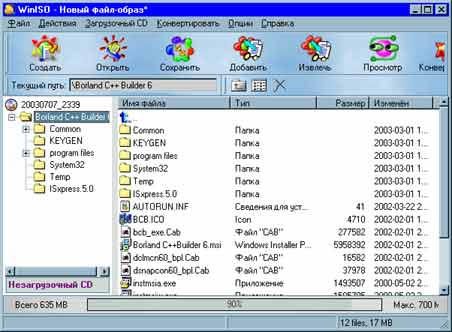
WinISO v5.3

File size 1.18 MB (<1min @ 1Mbps)
Operating systems Win2k / Win95 / Win98 / WinME / WinNT / WinXP1

Description
WinISO is a CD-ROM image file utility that can convert BIN to ISO, extract/edit/create ISO files directly, make bootable CDs and as a BIN/ISO converter/extractor/editor. It can process almost all DVDR / CDR image file(s) including ISO and BIN. With WinISO, you can add/delete/rename/extract file(s) within image files. You can convert image files to the standard ISO format and you have the ability to create ISO image file(s) from a CD-ROM or a DVD disk.
no image

Xilisoft iPhone Video Converter v5.1.23.0430


Xilisoft iPhone Video Converter

File size 15.68 MB (2min @ 1Mbps)
Operating systems Vista / Win98 / WinME / WinNT / WinXP1

Description

Xilisoft iPhone Video Converter is a iPhone converter software to convert all video files such as MOV, MP4, RM, RMVB, DivX, ASF, VOB, 3GP, WMV, MPEG, AVI to iPhone compatible format. Xilisoft iPhone Video Converter helps you watch music video, movies on your iPhone and computer easily and with great quality. It can also convert iPhone music MP3, WAV, M4A from popular music files, such as WMA, MP2, OGG, RA, AC3, APE and CDA.

Download Now
Thursday, April 8, 2010
Penghuni Rumah Kosong 2009

Penghuni Rumah Kosong 2009


Download Now

Via Rapidshare :
http://rapidshare.com/files/328686626/Penghuni.Rumah.Kosong.VCDrip.2009.BBa.CD1.part1.rar
http://rapidshare.com/files/328707216/Penghuni.Rumah.Kosong.VCDrip.2009.BBa.CD1.part2.rar
http://rapidshare.com/files/328732204/Penghuni.Rumah.Kosong.VCDrip.2009.BBa.CD2.rar

Via Megaupload :
http://www.megaupload.com/?d=1EZI1HBC
http://www.megaupload.com/?d=J53SUJHB
http://www.megaupload.com/?d=17RO6TQJ
Quick Message
Press Esc to close
Copyright © 2013 100Share 4U All Right Reserved