Breaking News
Loading...

Recent Post

Saturday, June 26, 2010
CardRecovery v4.1 full
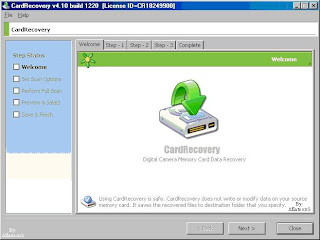
CardRecovery v4.1 full

CardRecovery is the leading photo recovery software for memory card used by digital camera. It can effectively recover lost, deleted, corrupted or formatted photos and video files from various memory cards. It supports almost all memory card types including SD (Secure Digital) Card, CF (Compact Flash) Card, xD Picture Card, Memory Stick, SmartMedia Card, MicroDrive, MMC (MultiMediaCard), MicroSD, MiniSD and more.

CardRecovery, the award-winning digital photo recovery software is the reliable solution for digital image recovery, digital picture recovery, digital media recovery, photo rescue, photo restore, data recovery, or whether files were deleted, the storage was damaged or formatted.
Our unique and exclusive SmartScan technology completes those impossible recovery tasks that other software cannot touch — SmartScan quickly locates and restores files that other recovery software could never find.
Using CardRecovery is safe and risk-free. The software performs READ-ONLY operations on your memory card. It doesn’t move, delete, and modify the data on the card to avoid causing further damage or overwriting. It recovers the photos and movie clips from the source memory card and saves them to the destination location you specify.
CardRecovery Features
* Recover deleted photos from memory cards.
* Recover lost photos from memory cards.
* Recover photos from formatted memory cards.
* Recover photos from damaged, unreadable or defective memory cards.
* Recover pictures from removable storage including floppy disks, Zip disks etc.
* Recover images, audio/video, MP3/MP4 files from cellular phones, MP3 players, PDAs.
Supported Storage
* Compact Flash card, CF card recovery
* Memory Stick, Memory Stick Duo, Memory Stick Pro, Memory Stick Pro Duo recovery
* Secure Digital card, SD card, miniSD, MicroSD, TransFlash memory card recovery
* MultiMedia card, MMC card recovery
* SmartMedia, SM card recovery
* xD Picture card recovery
* Micro Drive, MicroDrive recovery
* Cellular phone, PDA, MP3 and MP4 player digital media recovery
* Floppy disk, Zip disk digital image recovery
Supported Situations
* Photos deleted accidentally or intentionally from memory cards.
* Photo loss due to formatting or “Delete All” operation.
* Memory card error or damage, or inaccessible memory card.
* Corruption due to the card being pulled out while your camera is on.
* Damage due to turning your camera off during a write/read process.
* Data corruption due to critical areas damage e.g. FAT, ROOT, BOOT area damage.
* Data loss due to using between different cameras/computers/devices.
* Other events that could cause damage to data.
Supported Photo Types
* Common Picture Formats: JPG JPEG TIF GIF TIF PNG BMP
* Common Video Formats: AVI MPG MPEG MOV ASF MP4
* Common Audio Formats: MP3 WAV
* RAW Image Formats: Nikon NEF, Canon CRW and CR2, Kodak DCR, Konica Minolta MRW, Fuji RAF, Sigma X3F, Pentax PEF, Sony SRF, Olympus ORF and more.
Supported Camera Brands
* Nikon, Canon, Kodak, FujiFilm, Casio, Olympus, Sony, SamSung, Panasonic
* Fuji, Konica-Minolta, HP, Agfa, NEC, Imation, Sanyo, Epson, IBM, Goldstar
* LG, SHARP, Lexar, Mitsubishi, Kyocera, JVC, Leica, Phillips, Toshiba, SanDisk
* Chinon, Ricoh, Hitachi, Pentax, Kinon, Verbatim, Vivitar, Yashica, Argus, Lumix
* Polaroid, Sigma and almost all digital camera brands in the market.
Supported Flash Memory Card Manufacturers
* SanDisk, Kingston, KingMax, Sony, Lexar, PNY, PQI, Toshiba, Panasonic
* FujiFilm, Samsung, Canon, Qmemory, Transcend, Apacer, PRETEC, HITACHI
* Olympus, SimpleTech, Viking, OCZ Flash Media, ATP, Delkin Devices, A-Data
* and almost all digital camera memory card brands in the market.


Friday, June 25, 2010
no image

List Of The Content

Masih loading bro... sabar ya...


Wednesday, June 23, 2010
no image

Nero Ultra Edition 7.10.1.0 ( Including Serial


Editor's Review - Nero 7 Premium Reloaded

Nero 7 is an all-in-one CD/DVD recording application suite and more.

The installation process is designed to fit everyone's needs, whether you are a beginner, by choosing a typical installation, or you are an advanced user, by just selecting the components you need or a full install. The last installation step activates Nero Scout and allows you to select Nero to be associated with image, video, and audio files in order to ease access to Nero Home Media Manager. Nero Scout has integrated a brand new component called Nero Search, which provides quick searching capabilities on your computer or on the Internet.

Once the package is installed, you can choose to run your applications independently from Nero Home or from Nero StartSmart control center. The Nero 7 package contains Nero StartSmart, Burning ROM, Nero Express, Nero Vision, Nero BackItUp, Nero Cover Designer, Nero Wave Editor, Nero SoundTrax, Nero ShowTime, Nero MediaHome, Nero Recode, Nero PhotoSnap, Nero PhotoSnap Viewer, Nero ImageDrive, Nero BurnRights, Nero ProductSetup, Nero CD-DVD Speed, Nero DriveSpeed, and Nero InfoTool.

Nero Home is a multimedia manager that allows you to record or playback all types of media images, movies, and music. Similar to Windows Media Center, Nero Home is tool, which manages your entire multimedia collection and features, advanced playback capabilities, as well as capturing video from any source like TV cards, graphic cards, camcorder, VCR, or webcams (composite/S-video).

Nero StartSmart is the main Nero suite launcher, which contains shortcuts to all Nero applications and services. You can select any task and Nero StartSmart will automatically start the appropriate application in order to perform your desired operations.

Nero Burning ROM is the key feature of the Nero suite. Well known for its CD/DVD burning capabilities, now Nero Burning ROM also features support for Blu-ray disk data recording.

Nero Express is actually a simplified version of Nero burning ROM, since it has been redesigned to increase speed, efficiency, ease of use, and to keep the performance standards of Nero Burning ROM.

Nero Vision allows you to capture video from external sources and create DVD-Video, VCD, SVCD, and miniDVDs. Among its options, we may mention the capability of creating animated menus for DVD-Video: 3D menu scenes, translations between menus and video clips.

Nero BackItUp helps you keep your files and folders secure from damage because of system crashes, power failure, etc. In case you want to backup entire partitions, the backup process will take a little longer than other backup applications, such as Acronis True Image. It took 17 min, 40 sec. to backup a 35Gb hard drive which had 7.23 Gb occupied.

Nero Cover Designer allows you to customize your disk cases. You can choose to create your own disk covers or you can use one of the dozens of templates available.

Nero Wave Editor provides you with recording and editing tools for AIF, MP2, WMA, MP4, WAVE, and NWF audio file formats. You can record sound from multiple sources, like CD, Line In, Microphone, etc.

Nero SoundTrax is a professional audio mixing utility. It supports 7.1 channel surround real time editing and mixing. It transfers to your PC old tapes, CDs, and even vinyl records.

Nero ShowTime is a fully featured multimedia player. You can play all types of video and audio files, including DVDs with subtitles and frame capture capabilities.

With Nero Recode you can recode non-copy protected movies (DVD-9 to DVD-5) to a CDR/RW, DVD+/-R or a single DVD+R DL disc in DVD-Video format (DVD-9 to DVD-9). It includes MP4 support for iPod encoding. You can import a DVD, select video and audio quality, get subtitles, or even recode it to 8cm DVD (1,4 Gb), DVD5 (4,7 Gb) or custom size video. Video files can be previewed in the internal viewer.

Nero PhotoSnap is not a very impressive image-editing tool. It can open a large array of image files and it features many effects such as image sharpening, color balance, lens distortions, rotate, redeye removal, etc. On the other hand, you cannot draw, add text, insert shapes, or convert images.

Nero ImageDrive is a virtual drive mounter, which supports integration into Windows Explorer as well as up to two virtual drives.

The interface is very well designed and it provides quick access to all Nero features like data, audio, or video CD burning. Converting audio CDs to audio files, encoding audio files with a large variety of extensions, copying CDs, backing up files, restoring back-ups, burning images, or erasing CDs are very accessible as well. You can also change the way Nero looks by choosing a skin of your liking. All usual file formats are supported.

There is also an extremely useful selection of favorite applications you can choose from, such as making data DVD's, making mp3 or WMA DVDs, copying DVDs, backing up files, restoring back-ups, and burning images. The tools provided allow you to check drive speed, set burning rights for different users, and obtain system information.

Pluses: CD/DVD overburning, some nice utility tools such as system information, test CD/DVD drives for transfer rates, DAE quality, access/seek times, CPU usage, burst rates, etc., as well as controlling the cover, drive speed, and CD/DVD label manager. Nero 7 also supports burning of short Lead Outs. Thus, one can save up to 80 seconds when burning a CD/DVD, and has only 12 Mb of free storage location.

A great feature of Nero is InCD. An application which allows you to read discs written in MRW format on systems that do not support MRW as well as discs written in a UDF format that are not natively supported by your operating system. InCD is a drag-and-drop writing utility, which provides DVD-RAM, Blu-ray support, and DVD-RW quick format.

Drawbacks / flaws: Nero BackItUp lacks incremental and differential backup options, as well as the fact that it cannot create a full backup of the primary partition because the file system is in use.

In conclusion: Burning CD/DVD-Video, Photo, Data, Audio, or BackUp files, as well as mounting images. All utilities integrated in an extremely comprehensive and reliable package. A few minor flaws, but overall it's an excellent program!


http://hotfile.com/dl/42100367/ab5ec2b/Nero_7.10.1.0.part1.rar.html

http://hotfile.com/dl/42100477/c7ae7ec/Nero_7.10.1.0.part2.rar.html
AI Roboform Enterprise 7.1.0.0 Full

AI Roboform Enterprise 7.1.0.0 Full

RoboForm Enterprise is an advanced, full-featured--distributed--password management solution that:
  • improves security
  • increases employee productivity
  • decreases IT and support costs, and results in
  • an immediate Return on Investment

RoboForm Enterprise remembers your employees' passwords, securely stores them on their computer, logs them into web applications automatically, and completes forms with one click. Many of your power users may already be using and benefiting from a personal copy of the consumer version of RoboForm.

Features:
  • AutoSave passwords in browser.
  • AutoFill passwords to login form.
  • Click Login button for you.
  • Fill personal info into online forms.
  • Save offline passwords & notes.
  • Fight Phishing by entering passwords only on matching web sites.
  • Defeat Keyloggers by not using the keyboard to type passwords.
  • Generate Secure Random Passwords.
  • Encrypt passwords and personal data using AES, Blowfish, RC6, 3-DES or . 1-DES algorithms.
  • All personal info is stored on your computer only.
  • Take RoboForm with you on USB disk for ultimate portability.
  • Sync your passwords and notes to Palm or Pocket PC.
  • Backup & Restore, Print your passwords.
  • It is well-behaved: NO ADWARE, NO SPYWARE.
  • Works under Windows as an add-on to IE-based browsers.
  • Works with Netscape, Mozilla, Firefox under Windows.
  • Changes in Version 7.1.0.0:
  • Enhanced non-web logins to support most Win32 based applications
  • Option to use Windows Logon in lieu of the RoboForm Master Password, thus enabling employee password management without any additional passwords.
  • Integrates with biometric device to replace Master Password with fingerprint authentication.
Multilingual: English, Spanish, French, Italian, Portugues, German, etc
Compatible with: Windows 2000, XP, Vista and Win7 (32/64-bit)

Native Intruments Guitar Rig 4

Native Intruments Guitar Rig 4

Native intruments Guitar Rig 4 | 281 MB

GUITAR RIG 4 PRO is the ultimate all-in-one guitar and bass solution for perfect custom tone. The powerful and intuitive software comprises of a vast array of amps, cabinets, mics and effects, recreated in stunning detail. The latest version includes 2 new amps, 4 new super-flexible effects and above all, the revolutionary Control Room for that “big bucks” studio tone.


http://rapidshare.com/files/288197999/Gitar4.part1.rar
http://rapidshare.com/files/288214311/Gitar4.part2.rar
http://rapidshare.com/files/288214235/Gitar4.part3.rar

Pasword: www.downturka.net
Tuesday, June 22, 2010
no image

Nero 9 - Reloaded V.9.4.26 Multilanguage

Nero 9 - is a set of software digital media and home entertainment center the next generation, which is the most trusted in the world. It features new cutting-edge functionality that makes enjoying digital media content simple. New multimedia features help users to take advantage of technologies Nero in all supported versions of Windows. The updated version of Nero 9 Reloaded, users can archive high-definition video format HD (High-Definition) without requiring the use of a special drive.
Contents in the AVCHD format is now simply imported into the program Nero Vision, then archived on any available hard disk, a removable USB-drive or memory card. Recorded on the contents of these drives can then be played on a player, Blu-ray.

Nero 9 Highlights:
- Fast and easy rip, burn, auto backup and copy functions;
- Backup files to CD, DVD and Blu-ray discs;
- Copy, burn, share, upload, and create music mixes like a DJ;
- Operational downloading photos and videos to My Nero, and other online communities;
- Maintaining records of films in standard HD - the highest quality, and format AVCHD, in either AVCHD format on hard disks, removable USB-drives (quests, conundrums) and SD cards and Sony Memory Stick ...


Minimum system requirements:
Operating system: Windows XP SP2/XP Media Center Edition 2005 SP2/Vista SP1 / 7
Processor: Pentium III 1 GHz (Pentium 4 2 GHz for Vista / 7)
Memory: 256 MB (512 MB for Vista / 7)
Video Card: 32 MB, 800x600, 16 bit, DirectX 9.0c
Available at Railway: 1.8 GB
CD-ROM speed: 4x
Year: 2009
Version: 9.4.26.0
Language: Russian, English, German, French, Spanish
Size: 374.2 MB
Medicine included

Sunday, June 20, 2010
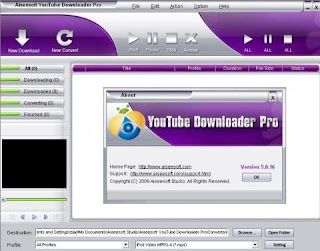
Aiseesoft YouTube Downloader Pro v5.0.16

Aiseesoft YouTube Downloader Pro v5.0.16

Aiseesoft YouTube Downloader Pro is the professional YouTube video downloader to download video from YouTube, Google Video, Yahoo Video, and many others. The supported video sites can be up to 150. It also supports more protocols including http, rtsp, rtmp, mms and more threads for downloading task. Using as YouTube Video Converter, the downloaded video can be converted to any other formats like MP4, H.264, AVI, MPEG automatically for you to enjoy on iPod, iPhone, PSP, Cell Phone, Windows Media, etc. any where and any time.

This powerful YouTube Downloader also works as video converter for you to convert your local FLV, F4V, SWF video to any other video/audio formats. More specific output parameters are available for you to adjust to get the exact file including Video Resolution, Video Bitrate, Frame Rate, Encoder and Audio Channels, Sample Rate, Encoder, Audio Bitrate.


Key Functions
Online video downloader
Using this YouTube Downloader tool, you can download almost all the online video from almost 150 video sites like YouTube video, Google video, iFilm, Myspace, Dailymotion, etc.
Convert the downloaded video or the local file
The download video files can be directly converted to any other video/audio formats. You can directly add local video files to convert as the video converter.
Set the specific output parameters
For you to get the exact file from the video site, this YouTube downloader provides you more specific parameters including Video Resolution, Video Bitrate, Frame Rate, Encoder and Audio Channels, Sample Rate, Encoder, Audio Bitrate.For you to get the exact file from the video site, this YouTube downloader provides you more specific parameters including Video Resolution, Video Bitrate, Frame Rate, Encoder and Audio Channels, Sample Rate, Encoder, Audio Bitrate.
Preview the downloaded and converted video file
After you successfully download the online video, you can preview the downloaded file on the preview window.

Key Features
Support more video site and protocol
The supported video sites can be up to 150 and it supports more protocols including http, rtsp, rtmp, mms.
Support multi-downloading tasks and multi-threads
This FLV downloader can set maximum downloading tasks and maximum threads for every task.
Show you the downloading/converting speed and progress exactly
In the bottom of the interface, the exact statistics of downloading/converting speed and the progress will show you to view it.
Easy to use
Aiseesoft YouTube Downloader has a built-in "monitor" can detect the video being played. Set the output destination and click start to begin the downloading instantly to finish it.

Quick Message
Press Esc to close
Copyright © 2013 100Share 4U All Right Reserved