Breaking News
Loading...

Recent Post

Showing posts with label Internet. Show all posts
Saturday, May 22, 2010
no image

Mobile Connections v0.42

• Summary: Search your Train connections in Germany for the entire network of the DB and major routes in Europe. More Routes to follow. Completly finger friendly

• Requirements:
Windows Mobile Pocket PC 5 , 6 , 6.1, 6.5, 6.5.3

» mobileConnections Description
Developer: brAndi
Support Email: support@erst0r.de
Web Site: http://erst0r.de

You can search all the routes of the german train system in germany and the major routes of europe (Netherlands, Belgium, Austria, Switzerland, Denmark, Poland Chez Rep., Franze, Spain, Protugal, Italy, UK and others.

The Program uses the Manila SDK 1.2

[Requirements] +SqlCe 3.5 is required! +.NetCF3.5 is required! [Version 0.11]
Fixed a Bug for the German ä,ö,ü and added new functions for Traveldate and Traintype selection.

[Version 0.20]
+More Features and Travel Details
+More Stabillity
+New Icon


[Version 0.21]
+ finally fixed the "Umlaute" Problem.

[V.0.22]
+More Info on Details
+ErrorOutput on Failure
+Fixed Detailed Output to be more correct

[V.0.23] +Fixed Bus and Tram +Fixed Capital Umlaute und "ß" in Search. +Fixed Output without Price Information [V.0.30]
+Favorites Function
+"Zuglaug" View for every single Operating Train
+Fixed a lot of the Output.
-SqlCE is still quite Slow, need to fix that soon!
+SqlCE is required to be installed for this build!
[V.0.31]
+Hotfix for GUI Error
[V.0.32]
+SqlCe Hotfix - Now the performance is good!
[V.0.33]
+New DateControl
[V.0.34]
+Fix for Walking and Unsupported Traintypes
+Fix for TimeDelay
+Added the Microsoft SqlCE Server to the Cab.
[V.0.40]
+Added MyLocation Service for Startplace
+Fixed a lot of Output
+Added Status Panel [V.0.41]
+Checking for Updates
+Self Locationing is better now
+Fixed some Outputs
+Fixed Status Panel
[V.0.42]
+Fixed Output for not-Supported Connections
+Fixed Warnings for Wrong Details
+Better Analytics.


no image

Late Reader v0.10

• Summary: Late Reader is a Windows Mobile application for reading your Read It Later lists. Actually this application does (or aims) more than just reading your list. You can search, sort your list, download pages for offline reading. Share your list items with others. And more.
• Requirements:
Windows Mobile Pocket PC 5 , 6 , 6.1 .NET CF 3.5

» LateReader Description
Developer: Hakan Serce
Support Email: hakanserce@gmail.com
Web Site: http://vizierspalace.blogspot.com/

Late Reader is a Windows Mobile application for reading your Read It Later lists. Actually this application does (or aims) more than just reading your list. You can search, sort your list, download pages for offline reading. Share your list items with others. And more. Please note that this is a .NET application and requires .NET CF 3.5+ to be installed on your device.
Late Reader v0.1.0
- C# API wrapper for RIL web based API
- Login
- Signup
- Reading List UI
- Page Text rendering (I am doing this from scratch as the .NET WebBrowser component seems to be unusable for me)
- Currently Reading (Remembers what you were reading last time)
- Syncing with the RIL server
- Storing the list and Page Texts for offline viewing
- favicon image display in reading list
- Mark as Read/Unread functionality in the reading list
- Search in reading list
- Sorting in reading list
- Kinetic scrolling in Page Text display
- Currently reading context menu
-fontsize: tiny, small, normal, large, huge
-show more/less (depending on the current mode),
-show full in browser
-update pagetext (download again)
- Threaded syncing
- Use of codepages in Currently Reading view
- Get only list as an option
-Show whether pagetext is available with an icon
-Let the user mark items for downloading with the next sync
-By default do not download READ item page text
-Make this an option
- [FIXED]reading list does not update after a sync (at least the sorting is not applied)
- [FIXED]currently reading mode (less/more) is not stored
- [FIXED]When no text is available in Currently Reading Panel a message indicating less mode is shown, but sometimes the same thing happens in more mode as well
- [FIXED]Better rendering of PRE/CODE tags
- [FIXED]Every form is displayed as a separate app in task managers, we should have only one item instead
- [FIXED]Some items are displayed twice in All view (maybe read items?)
- [FIXED]max mode of main form is sometimes hindered with the title bar (especially after a long running sync operation)

Planned Features
- Item Title/Tags? editing
- Better UI
- Better rendering (more html tag support) in the Page Text display
- Pinch zooming in the reading list and Page Text display
- Application Settings UI
- Image download/display option in the Page Text display
- Better Application icon
- Share (twitter, facebook, email)
- ! Paging in currently reading (better memory management)
- Show progress info during syncing
- Currently reading context menu - share (twitter, facebook, email)
- Shake based URL add (with a translucent form with two buttons: "Read It Later" and "Open Late Reader")
-for Opera 10
-for other browsers later
- Archieve
- Tags Chooser (like in blog page tags)
- Delete an item
- Application settings
- Reading bg color/fgcolor selection
- Better rendering of long words (words longer than a line should be splitted)
- Page transition effects (from main form to reading list, reading list to currently reading)
- check connection state and open upon user approval during
-sync
-open in external browser
-share via email,facebook,twitter
-update pagetext
- Download/display page images
- Rotate/auto rotate
- Reading list button animation (Button down effect)
- Kinetic scrolling in reading list
- Store currently reading scrollposition
- Performance improvement
-Optimize justified text rendering
-Decrease memory usage (easily reaches 5-6 MB currently)
- Handle "Login Needed" response type for page text downloading
- Handle "Next Page" in a response to pagetext downloading
-Add option to download next page as well
-Add option to select max number of next pages to follow (depth of download)
-Display next page following the normal text page in the "Currently Reading" view
- Full screen option in Currently Reading view (in context menu)
- Statusbar for displaying number of items ec. in the list
- Option to delete pagetexts of read pages
- Faster "mark for download" with a switch control (suggested by spyrale)

Bugs/Annoyances
- SIP auto activate/deactivate when focus enters/exits text boxes
- error messages generated by RILAPI are not displayed at all (maybe not generated correctly?)
- favicon is not correctly drawn (transparency issue)
- tag defined favicons are not currently downloaded

Credits
* First of all thanks to xda-developers forum user zefiltrin (hugocbp) for the idea (see his thread), also thanks to other members on that thread for their comments
* LateReader uses Sense SDK, and I must admit that this wonderful library freed me from hundreds of lines of custom drawing code.
* I used Majestic12 HTML parser for parsing page texts
* Finally I must thank to the makers of Read It Later


Monday, May 17, 2010
no image

Pocket Shopping v1.50

• Summary: PocketShopping is a finger-friendly shopping list software which allows you to maintain a master list of products you buy on a regular basis.

• Requirements:
Windows Mobile 5.0 or 6.5 with .NET Compact Framework 2.0 or later
» PocketShopping Description

Developer: LopeSoft
Support Email: support@lopesoft.com
Web Site: http://www.lopesoft.com/
PocketShopping is a finger-friendly shopping list software which allows you to maintain a master list of products you buy on a regular basis.

Main features:

- Finger-friendly user interface with smart scrolling, gestures and animation effects, similar to iPhone applications.
- Group the products by shop and by category.
- Unlimited number of shops, categories and products.
- Arrange the categories for each shop, by their location as you walk through the aisles. The products are sorted alphabetically.
- Two operating modes: selecting products to buy and going shopping. First, you must select from the master list the products which you want to buy, also you can add new products, categories and shops. Then, when you go shopping, change to "Go Shopping" mode, and you only will see the products which you selected previously, and then while buying you can mark the products introduced in the shopping cart.
- Set the unit type of each product (units, boxes, packets, Kg, etc.), and set the default unit type of each category (when adding a new product in a category, automatically the default unit type of the category is assigned to the new product).
- Set the quantity to buy for each product and the price.
- Quick search of products by using the keyboard.


no image

UCWEB v7.04

• Summary: UCWEB series help you to put the Internet in your pocket!

•Lisensi  : Freware

• Requirements:
Windows Mobile Pocket PC 5 , 6 , 6.1

» UCWEB Description

Made by: UCWEB Technology v7.0.41
It's a mobile browser. Enjoy a trip to wireless internet world.

UCWEB Features: - Browsing function
- Navigation function
- Search function
- Email service
- Download function
- Personal data managemet
- RSS subscription function
- Shortcut key application

 Six reasons to fall in love with UCWEB
Browsing function
Are you boring with a dull WAP site? Are you upset with the blank display in a wap site? UCWEB will change all those problems on the mobile Internet! with UCWEB, you can not only visit WAP site quickly, but also the colorful WEB sites fluently, to enjoy the pleasantness of wireless thoroughly.

Navigation function
Wireless is more colorful! Information, entertainment, community, forum, blog, it’s all we have. Site navigation service recommends excellent internet sites and hot sites to you! Click! click! click! It’s so easily to access the site. Opening the site you want quickly, reading what you like, and listening what you love.

Search function
Don’t doubt the voluminous information can be searched on your mobile phone! With UCWEB, you can do it! UCWEB offers various search engines, such as Baidu, Google, Yicha, to satisfy your desire of searching the whole Internet. UCWEB supports to search by sort, such as web pages, MP3, pictures, maps,etc

Media function
Online media playback function is available in UCWWEB 6.3. You may watch the hottest TV channels and the splendid original video clips and listen to the latest popular songs on your phone with UCWEB6.3.

Download function
Beautiful pictures!MP3!Characteristic phone ring tone! UCWEB lets you get all you want. The powerful download function makes your download easily, and which make you save time and cost. UCWEB download function supports the big file download and the break points discontinuous transmission, which adopts the data compression technique to reduce the data traffic.

Personal data management
Do you regret that you can’t save the sites/pages you like? Is there no storage space for storing MP3, games? Is data lost when you change mobile phone? Don’t worry, UCWEB resolves these problems for you! It offers service such as bookmark, favorite, user can manage web sites which regularly browsed easily in mobile phone or in PC. The mobile phone hard disk is the bridge of PC and mobile phone, by which accessing the picture, MP3 and game is easy

RSS subscription function
With a mobile phone, the latest hot Internet information can be subscribed! With RSS news subscription function you can subscribe RSS seeds, and manage the RSS resource, and then read the updated details in RSS freely. You can login directly in your mobile phone, or open http://my.ucweb.com/ to subscript the RSS seeds.

Shortcut key application
With the shortcut key function, it makes the whole operation process of UCWEB simply, convenient. You can assemble shortcut keys with single key or double keys, and setup shortcut key by yourself. The customized service makes you enjoy the fully wireless happiness.
no image

fim - Facebook Instant Messengerv2.35

• Summary: Facebook Chat and More
• Requirements:
Windows Mobile Pocket PC 5 , 6 , 6.1, 6.5
» fim - Facebook Instant Messenger Description
Developer: Mosko.Mobi
Web Site: http://mosko.mobi/
Features:
* Facebook Chat
* Status Feed
* Notifications & New Messages Indicators
* Picture & Video Uploads Directly From Your Phone
* Integrated m.facebook.com Browser

Advantages:
* All Display Resolutions
* Touch Friendly
* No 3rd Party Registration
* AppToDate Support

Installation:
Download the mobile installer (.cab file) to your desktop. Sync with your mobile phone and copy the .cab installer to your phone. From your phone go to Programs -> File Explorer, navigate to the .cab file and select it. The Installer should do the rest.


Wednesday, May 5, 2010
no image

imgur Uploader v1.00

• Summary: Easily upload images to imgur.com from Windows Mobile and share them on Twitter
• Requirements:
Windows Mobile 5+
.NET Compact Framework 3.5
Tested on VGA and WVGA, but it should work on all resolutions

» imgur Uploader Description
Developer: ViRGIL
Support Email: virgil_blog@yahoo.com
Web Site: http://www.lavirgil.ro

Features
  • Upload images to imgur
  • Twitter integration
  • Camera access
  • Clipboard access
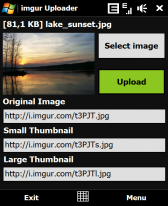
This application allows you to upload a picture, existing or taken with the camera from within the application, to imgur.com and shows the link for the original picture, small thumbnail and large thumbnail. The links can be shared with your twitter friends or copied to clipboard in order to use them later (email, sms). Known issue: the thumbnail displayed in the application aspect ratio isn't always the same as the original picture aspect ratio. I will try to fix that in future releases. Please leave your feedback in a comment. Thank you!


Source: http://www.freewarepocketpc.net/ppc-download-imgur-uploader.html
~Download Now
Monday, April 19, 2010
no image

Infinity Web Browser


• Summary: Infinity full functioned browser on Android
• Requirements: Android Phone


~Description
Infinity Web Browser on Android is not only a full functioned browser to help you surf web smoothly, but also specializes the following differentiated features from others:

* Tabbed browsing
* Multiple language instant news portal for multiple countries and regions around the world
* All-in-one search including web, image, blog, Youtube video, local business, news, book and patent
* Built-in full featured text & web page translator
* Built-in RSS (feed) subscription and online and offline reader
* Built in Youtube video watch
* Built in 3gp/mp3/mp4 audio/video player
* Find In Page
* Downloads
* Slick and easy-to use interfaces
* Full Screen Mode (in menu)

Recently, we have been working hard on developing new features for our latest product the Infinity Web Browser.

* you can long click links and pictures to save as, share, copy url and open/open in new tab
* create shortcuts to home screen by long clicking a bookmark in Bookmarks
* you can choose to show or hide the scroll bar and text on the main bar in settings
* There are many options tab related options to use when you long click a tab
* you can see the back/forward navigation history on the current tab by long clicking either back or forward
* The translation page automatically remembers your previously selected languages
* The translation page automatically takes the text on the clipboard and puts it int the “Enter a word” text box.
* Infinity supports auto-rotate if you enable the option in the phone’s settings app (Settings -> Sounds & Display -> Orientation)
* by pressing the add feed button on the main toolbar, infinity will auto-detect if there is a feed to be able to subscribe to
* on the homepage, you can select what you would like to search for in the options box (default is web)
* Infinity supports watching videos from links to youtube videos
* Reload and stop is combined as one button
* Clicking the search button with activate the Go to URL toolbar, holding the button with activate the Search toolbar

Infinity Web Browser Screenshots
Saturday, April 17, 2010
APOD Astronomy Picture of the Day Browserv0.56

APOD Astronomy Picture of the Day Browserv0.56

• Summary: APOD browser is Pocket PC software for the purpose of browsing NASA's 'Astronomy Picture of the Day' (APOD) web site.
• Requirements: Pocket PC 2003

» APOD Astronomy Picture of the Day Browser Description

The APOD browser is simple software for the purpose of quering NASA fantastic, unparalleled Astronomy Picture of the Day site. This tool allows searching the site by date, by a keyword or by the site editor's choice. A online connection is required for this application to work.

How to Use:
You can query APOD in basically three modes:

1. By Date
Select a date to view the APOD of that date. Since the first APOD image was presented on June 16, 1995, the calendar is limited to between June 16, 1995 and Today.

2. By Keyword
Enter a keyword of your choice and tap on [Search]. Make sure to avoid too common keys, such as 'moon', 'planet', etc. This would result in too many hits, since each occurance of that search string in APOD's texts will be output as result and is often not related to what you wish to explore.

3. By Choice
This mode searches the editor's choices for the most educational Astronomy Pictures of the Day. Simply select an item from the combo box. Each choice yields three to five hits as so well selected by the authors of APOD.

After closing the settings screen, tap on the GO menu to download the selected image and text. Tap on the image for a shrunk view that fills the screen without scrollbars.

Tap and hold on the image to open a context menu.

# Image info: shows image size.
# Negative image: turns the image negative and back positive.
# Save Image and Text: saves the current image (negative or positive) to a subfolder named 'saved', including the explanation text. Please note that devices running Pocket PC 2003(SE) cannot save JPEG images, but large BMPs only (o/s limitation). You may wish to manually reduce the color depth of BMPs to 256 colors to save space. WM devices save images as JPEG, mostly staying under 100KB.
# Select another Image: turns to the Settings screen.

You can browse saved images with the cursor keys:

# Right key: one image forward
# Left key: one image back
# Up key: goes to the last image
# Down key: goes to the first image
# Center key: goes to the midmost image
Saturday, April 10, 2010
Wednesday, April 7, 2010
no image

WM WifiRouter 1.60

Description: WMWifiRouter instantly turns your Windows Mobile device into a wireless internet hotspot. Now you can use your laptop and any other device with wifi to get online and surf, email, instant message, and anything else you normally use the internet for!

Features:
* Share your cellular data/internet connection over wifi
* Connect any wifi-enabled device with ad-hoc mode support
* Supports multiple devices at the same time
* Easy to use: for most users, getting up and running is a matter of a single click
* Power saving: works even when the device is suspended!
* IP, wifi and cellular configuration built-in
* 64- and 128-bit WEP encryption support
* Automatic reconnect on connection loss
* Compatible with almost all recent Windows Mobile devices
* Distinction between basic and advanced users
* Keep-alive support to prevent automatic disconnects for specific carriers
* Battery monitoring and management
* Support for sharing your cellular data connection over bluetooth and usb
* Support for sharing your wifi connection to usb, and vice versa
* Multi-language support # Ability to feed internet to your normal wireless router, with WPA encryption
# Live traffic statistics
# Live DHCP statistics
# Port mapping support
# DMZ support

WMWifiRouter 1.60
This new version brings a long list of changes. Excluding the minor changes, tweaks and bug-fixes, here are the main ones:

- Due to further optimizations the complete WMWifiRouter package is now about 35% smaller

- Various minor UI tweaks for better compatibility with Windows Mobile 6.5 and 6.5.x

- The setup procedure for new installs is now much shorter. Of course, all configuration options you may ever need are still available under Options -> Configuration

- Some informational pop-ups have been added

- When sharing over Wi-Fi, an informational window now pops up listing the network name and password

Device specific compatibility updates:
- HTC HD2
- Samsung Omnia II
- Samsung Omnia Pro B7320
- Samsung Omnia Pro B7330
- Samsung Omnia Pro / Qwerty B7610
- Samsung B7620 / Giorgio Armani II


Thursday, April 1, 2010
no image

ShortenMobile 1.2 – url shortener for Windows Phone


ShortenMobile watches the clipboard of the device and automatically shortens the urls for you. The application can be set to run at start up and hides in the background.

Currently implemented url shortening services:
  • bit.ly
  • tinyurl.com
  • snipurl.com
  • is.gd
How to use:

  • Install the cab file
  • Open ShortenMobile from StartMenu
  • Activate the checkbox “Run at startup”
  • Click on Hide-Softkey
  • Copy any url (including “http://” at the beginning) to the clipboard
  • The shortened url is available in the clipboard after the confirmation dialog has been shown
Requirements:
Microsoft .NET Compact Framework 3.5

www.1800pocketpc.com
Sunday, March 14, 2010
» iSearch

» iSearch

Summary: Web search launcher for S60 5th Edition
Requirements: Symbian S60 5th Edition
Price: Freeware

The iSearch widget is inspired by Russell Beattie’s Q Search widget. Russell made his with 30 lines of code – I used a bit more. iSearch widget has a touch friendly UI and there are currently 8 search options/engines to choose from. The widget is free but if you like it please consider making a donation.


WHAT DOES IT DO AND HOW?

iSearch speeds up the task of searching for stuff on the mighty Internet. Type a word to search for and click the service of your choice and the widget launches the phone’s browser and loads the result. The widget remembers the last thing that you searched for and displays it in the text box when you start the widget next time.

TIP! To make searching even faster you can set one of the services as default so that when you hit the ‘Enter’ key on the keyboard the widget launches the search right away. You set the default by clicking the ‘Enter’ symbol on the right end of the buttons.

iSearch Features:
Quickly launch searches for

- web sites google, bing
- images google, flickr
- video youtube
- tweets twitter
- facts wikipedia
- dictionary definr
- more services will be added according to users wishes

Saturday, March 13, 2010
» Opera mini 4.2

» Opera mini 4.2

Summary:
  • Surf the full Internet on any mobile phone.
  • Price: Freeware
Opera Mini allows you access to the full Internet on your mobile phone. Users can surf any Web site such as Google, Yahoo, Amazon, eBay, and Hotmail on their mobile phone just like they would on a normal computer. This includes the vast majority of today\\\s WAP-enabled phones. Instead of requiring the phone to process Web pages, it uses a remote server to pre-process the page before sending it to the phone. This is perfect for phones with very low resources, or low bandwidth connections.
 
» iPhonesque Mod

» iPhonesque Mod

Summary:
  • Make the web sites believe that your Nokia browser is an iPhone, Firefox, Internet Explorer, Blackberry and more!
  • Requirements: Symbian s60 Python For S60 v1.45
  •  Price: Freeware
»Aplikasi perangkat lunak Symbian Gratis!

Lebih dari 3.200 ensiklopedia Symbian S60 3 dan 5th edition freeware game, tema dan aplikasi untuk ponsel Nokia Anda.

Meningkatkan ponsel Symbian Anda dengan perangkat nirkabel, mobile email, tema dan kulit plus ratusan game selular, utilitas dan GPS perangkat lunak untuk S60, S80 dan UIQ. Gratis load aplikasi pada telepon Nokia n97 dan 5800 XpressMusic !

Membuat situs web Nokia Anda percaya bahwa browser adalah sebuah iPhone, Firefox, Internet Explorer, Blackberry dan banyak lagi! Software ini memungkinkan Anda untuk memodifikasi User Agent dari browser di S60v3 dan S60v5. Agen pengguna platform platform menunjukkan dari mana kita berselancar - jika kita pada Windows, Mac, Symbian, iPhone dan sebagainya.


Banyak situs sekarang memiliki versi mobile, tetapi beberapa dari mereka tidak memungkinkan kita untuk mencapai versi lengkap dan kita dipaksa untuk tinggal dalam "versi ringan" dari situs ini! Dengan program ini kita dapat mengubah UserAgent terpadu kami browser (bukan Opera Mini, dll) dan kemudian, menunjukkan bahwa ponsel tidak kita Symbian OS, tapi kita browsing di Firefox dengan Xp, atau Google Chrome dan banyak lainnya . Ini akan memungkinkan kita untuk melihat penuh dan tidak lagi versi mobile!

Jadi, jika situs web mencoba untuk melayani Anda Nokia-ized versi halaman-halamannya, bukan situs lengkap, jalankan User Agent untuk membuat server percaya Anda menggunakan browser yang berbeda.

Jika Anda tidak menjalankan skrip python anda akan memiliki perilaku default Anda, tetapi jika anda menjalankan dan pilih salah satu pilihan dari menu tersebut selain aslinya, agen pengguna yang akan digunakan sampai Anda mengubahnya lagi.

The requirements for this program are:
- V1.45 Python for S60 and Python Script Shell v1.45
- Have the files for certifying the two .sis files of the program, or have the phone hack made.
- Install the two files of the same drive where you installed Python
After having installed, run the program. Now that you are asked what UserAgent to use, select what you want and...enjoy!


» Opera Mini 5

» Opera Mini 5

Summary
  • The next generation of mobile browsing
  • Requirements: Symbian S60
  • Price: Freeware

In this fifth-generation version, Opera Mini is staying true to the company’s promise of a superior Web experience on any device. Introducing a new, sleek look and feel, Speed Dial bookmarks and tabs — together with Opera’s renowned speed — make this new version of Opera Mini the easiest-to-use Web browser on a phone.

Opera Mini 5 favorite features: 1. Sleek design — Opera Mini 5 features a new, intuitive and advanced look and feel.

2. Tabbed browsing — This desktop favorite is now available for Opera Mini. Tabs allow users to browser several sites simultaneously. This helps users easily jump from one page to another with the click of a tab.

3. Touchscreen or keypad browsing — Opera Mini caters to the needs of your phone, offering optimal browsing for both touchscreen and keypad-based phones.

4. Password manager — Opera Mini is a virtual memory bank, securely saving all passwords for e-mail, social-networking sites, online banking and more.

5. Speed Dial — This is our take on a table of contents for your Web adventure. Opera’s Speed Dial will greet you with your pre-selected Internet favorites upon loading the browser.


Quick Message
Press Esc to close
Copyright © 2013 100Share 4U All Right Reserved