Breaking News
Loading...

Recent Post

Saturday, May 22, 2010
no image

Download Pocket PC Application: iFonz


no image

W.V.D. Web Video Downloader


Summary: Download videos from various video sites to your windows mobile pda phone W.V.D. Web Video Downloader is the first software for Pocket PC that can stream* or download online videos from web sites like YouTube. W.V.D. supports most popular online web sites and many adults sites like Tube8. Download videos from various video sites to your windows mobile pda phone It's work also on wm5. Features: - Compatible with most popular websites. - Search by keywords or categories. - Support search results by detail or thumbnail. - Support thumbnail animation to preview videos. - Allows to stream* or download videos from websites. - Support many video formats. Compatible with: - Windows Moblie 5.0 / 6.0 / 6.1 Support VGA / QVGA

no image

Easy Today Launcher v1.1.0.3 Packet PC


Easy Today Launcher is a today Plug-In lets you add shortcuts to their favorite aplication on the today screen.

Developer: LoFFactory
Support Email: loffactory.filipeoliveira@gmail.com
Web Site: http://www.loffactory.webs.com/
Screen resolution: VGA, WVGA, QVGA, WQVGA After install go to start > settings > today > items > select easy today launcher > options > add/ remove the items


no image

My Player v1.52

• Summary: A light-weight application that provides access to BBC iPlayer, Live TV and On Demand services directly, eliminating the requirement of a (flash-enabled) mobile browser.

• Requirements:
Windows Mobile Pocket PC 6.0, 6.1 or 6.5; QVGA, VGA and WVGA support; .NET 2.0 framework or greater; a media player that supports RTSP streaming and the mpeg4 codec (eg. CorePlayer)
» My Player Description
Developer: Skynet Software
Support Email: skynetinfo@ftml.net
Web Site: http://www.skynetsoftware.com

myPlayer is a light-weight application that provides access to BBC iPlayer, Live TV and On Demand services directly - eliminating the requirement of a (flash-enabled) mobile browser.


Features:
- Choose your own media player - define how each stream is played (CorePlayer v1.3.6 is recommended)
- Full iPlayer integration - browse the Mobile content as you would from any other supported device (including the search feature)
- Download high quality BBC iPlayer episodes directly to your device for offline viewing
- Live TV channels - watch the popular terrestrial channels live (BBC, ITV, Channel 4, Five, etc.)*
- Four On Demand - catch up with the latest content from Channel Four
- Five On Demand - catch up with the latest content from Channel Five
- MSN Video - a further selection of streaming content from the UK
- SBS Australia - content from the Special Broadcasting Service**
- Extensive TV feed index - hundreds of live TV feeds from around the globe
- Live Radio stations - a selection of BBC broadcasts
- Custom TV / Radio stations - add your favourites
- Search History - tracks the most recent searches for easy access
- myPlayer streaming service - preconfigured VLC server to overcome connectivity issues (eg. blocked ports, non-UK region, etc.)


* CorePlayer is required to view the Live Digital TV streams

** The SBS channel requires a Flash player (the Adobe Flash Lite application is recommended)


Requirements:
- A media player that supports RTSP streaming and the mpeg4 codec (CorePlayer v1.3.6 is recommended)
- The .NET 2.0 Compact Framework (which is bundled with Windows Mobile Professional 6.0 and above)
- An internet connection that is UK based (for BBC iPlayer streaming)


*** Whilst streaming video this application will use a considerable amount of bandwidth - please ensure you have an unlimited data policy or a wifi connection ***


For help regarding the installation and use of the application please consult the myPlayer support page at http://www.skynetsoftware.com/myPlayer/support.aspx


Screenshots:


no image

Mobile Connections v0.42

• Summary: Search your Train connections in Germany for the entire network of the DB and major routes in Europe. More Routes to follow. Completly finger friendly

• Requirements:
Windows Mobile Pocket PC 5 , 6 , 6.1, 6.5, 6.5.3

» mobileConnections Description
Developer: brAndi
Support Email: support@erst0r.de
Web Site: http://erst0r.de

You can search all the routes of the german train system in germany and the major routes of europe (Netherlands, Belgium, Austria, Switzerland, Denmark, Poland Chez Rep., Franze, Spain, Protugal, Italy, UK and others.

The Program uses the Manila SDK 1.2

[Requirements] +SqlCe 3.5 is required! +.NetCF3.5 is required! [Version 0.11]
Fixed a Bug for the German ä,ö,ü and added new functions for Traveldate and Traintype selection.

[Version 0.20]
+More Features and Travel Details
+More Stabillity
+New Icon


[Version 0.21]
+ finally fixed the "Umlaute" Problem.

[V.0.22]
+More Info on Details
+ErrorOutput on Failure
+Fixed Detailed Output to be more correct

[V.0.23] +Fixed Bus and Tram +Fixed Capital Umlaute und "ß" in Search. +Fixed Output without Price Information [V.0.30]
+Favorites Function
+"Zuglaug" View for every single Operating Train
+Fixed a lot of the Output.
-SqlCE is still quite Slow, need to fix that soon!
+SqlCE is required to be installed for this build!
[V.0.31]
+Hotfix for GUI Error
[V.0.32]
+SqlCe Hotfix - Now the performance is good!
[V.0.33]
+New DateControl
[V.0.34]
+Fix for Walking and Unsupported Traintypes
+Fix for TimeDelay
+Added the Microsoft SqlCE Server to the Cab.
[V.0.40]
+Added MyLocation Service for Startplace
+Fixed a lot of Output
+Added Status Panel [V.0.41]
+Checking for Updates
+Self Locationing is better now
+Fixed some Outputs
+Fixed Status Panel
[V.0.42]
+Fixed Output for not-Supported Connections
+Fixed Warnings for Wrong Details
+Better Analytics.


no image

Doodle Jumpv1.00

• Summary: Doodle Jump for windows mobiles.
• Requirements:
Windows Mobile Pocket PC 5 , 6 , 6.1

» Doodle Jump Description
Developer: NPH Soft
Support Email: nph@sogetthis.com
Web Site: http://forum.xda-developers.com

Doodle Jump for windows mobiles. Click on screen left or right to move , tap to shoot. App is in French.. NO Accelerometer support.

no image

Late Reader v0.10

• Summary: Late Reader is a Windows Mobile application for reading your Read It Later lists. Actually this application does (or aims) more than just reading your list. You can search, sort your list, download pages for offline reading. Share your list items with others. And more.
• Requirements:
Windows Mobile Pocket PC 5 , 6 , 6.1 .NET CF 3.5

» LateReader Description
Developer: Hakan Serce
Support Email: hakanserce@gmail.com
Web Site: http://vizierspalace.blogspot.com/

Late Reader is a Windows Mobile application for reading your Read It Later lists. Actually this application does (or aims) more than just reading your list. You can search, sort your list, download pages for offline reading. Share your list items with others. And more. Please note that this is a .NET application and requires .NET CF 3.5+ to be installed on your device.
Late Reader v0.1.0
- C# API wrapper for RIL web based API
- Login
- Signup
- Reading List UI
- Page Text rendering (I am doing this from scratch as the .NET WebBrowser component seems to be unusable for me)
- Currently Reading (Remembers what you were reading last time)
- Syncing with the RIL server
- Storing the list and Page Texts for offline viewing
- favicon image display in reading list
- Mark as Read/Unread functionality in the reading list
- Search in reading list
- Sorting in reading list
- Kinetic scrolling in Page Text display
- Currently reading context menu
-fontsize: tiny, small, normal, large, huge
-show more/less (depending on the current mode),
-show full in browser
-update pagetext (download again)
- Threaded syncing
- Use of codepages in Currently Reading view
- Get only list as an option
-Show whether pagetext is available with an icon
-Let the user mark items for downloading with the next sync
-By default do not download READ item page text
-Make this an option
- [FIXED]reading list does not update after a sync (at least the sorting is not applied)
- [FIXED]currently reading mode (less/more) is not stored
- [FIXED]When no text is available in Currently Reading Panel a message indicating less mode is shown, but sometimes the same thing happens in more mode as well
- [FIXED]Better rendering of PRE/CODE tags
- [FIXED]Every form is displayed as a separate app in task managers, we should have only one item instead
- [FIXED]Some items are displayed twice in All view (maybe read items?)
- [FIXED]max mode of main form is sometimes hindered with the title bar (especially after a long running sync operation)

Planned Features
- Item Title/Tags? editing
- Better UI
- Better rendering (more html tag support) in the Page Text display
- Pinch zooming in the reading list and Page Text display
- Application Settings UI
- Image download/display option in the Page Text display
- Better Application icon
- Share (twitter, facebook, email)
- ! Paging in currently reading (better memory management)
- Show progress info during syncing
- Currently reading context menu - share (twitter, facebook, email)
- Shake based URL add (with a translucent form with two buttons: "Read It Later" and "Open Late Reader")
-for Opera 10
-for other browsers later
- Archieve
- Tags Chooser (like in blog page tags)
- Delete an item
- Application settings
- Reading bg color/fgcolor selection
- Better rendering of long words (words longer than a line should be splitted)
- Page transition effects (from main form to reading list, reading list to currently reading)
- check connection state and open upon user approval during
-sync
-open in external browser
-share via email,facebook,twitter
-update pagetext
- Download/display page images
- Rotate/auto rotate
- Reading list button animation (Button down effect)
- Kinetic scrolling in reading list
- Store currently reading scrollposition
- Performance improvement
-Optimize justified text rendering
-Decrease memory usage (easily reaches 5-6 MB currently)
- Handle "Login Needed" response type for page text downloading
- Handle "Next Page" in a response to pagetext downloading
-Add option to download next page as well
-Add option to select max number of next pages to follow (depth of download)
-Display next page following the normal text page in the "Currently Reading" view
- Full screen option in Currently Reading view (in context menu)
- Statusbar for displaying number of items ec. in the list
- Option to delete pagetexts of read pages
- Faster "mark for download" with a switch control (suggested by spyrale)

Bugs/Annoyances
- SIP auto activate/deactivate when focus enters/exits text boxes
- error messages generated by RILAPI are not displayed at all (maybe not generated correctly?)
- favicon is not correctly drawn (transparency issue)
- tag defined favicons are not currently downloaded

Credits
* First of all thanks to xda-developers forum user zefiltrin (hugocbp) for the idea (see his thread), also thanks to other members on that thread for their comments
* LateReader uses Sense SDK, and I must admit that this wonderful library freed me from hundreds of lines of custom drawing code.
* I used Majestic12 HTML parser for parsing page texts
* Finally I must thank to the makers of Read It Later


Monday, May 17, 2010
no image

Speeed Reader v1.15

• Summary: Speeed Reader is a Google Reader Client for Windows Phones.
• Requirements:

Windows Mobile Pocket PC/Standard 5 , 6 , 6.1
.Net CF 3.5
» Speeed Reader Description

Developer: Evan Halley
Support Email: speeedreader@gmail.com
Web Site: http://emuneee.wordpress.com/eeenno/Speeed-Reader

Speeed Reader by eeenno

Speeed Reader is a Google Reader client for Windows Phones. It connects users to their Google Reader accounts, allowing them to view and share articles on their Windows Phones.

Follow Speeed Reader on Twitter for application updates and support! (http://twitter.com/SpeeedReader)

Finally, license key for Speeed Reader: 858Bf079Jj

Release History
v0.94 – March 22, 2010
* Enhancement: Implemented Google Reader’s new authentication model

V0.93 – November 19, 2009
Bug Fix: Crash when starting Speeed Reader with cachning disabled (introduced in v0.92)
Bug Fix: Minor layout issues in the UI

V0.92 – November 18, 2009
Bug Fix: Passwords containing ‘&’ result in login issue (fixes login issue for some users)
Bug Fix: Search index always zero
Bug Fix: Not requesting all new articles in last refresh (with caching enabled)
Bug Fix: Crash when starring a reading list article
Bug Fix: Reading List, Starred, Shared Lists unreadable when coming out of offline mode
V0.91 – November 11, 2009
New Feature: 2 new themes (Noir – dark/black, Beach – coral/turquoise)
Enhancement: When navigating between multi-page lists, Speeed Reader will remember your page
Enhancement: Added bytes transferred (estimate) to the about screen
Enhancement: General Performance Increases/Memory Management
Bug Fix: Storage Card in Non-English Locale’s Not ID’d Correctly
Bug Fix: Clicking last item in reading list causes a crash
Bug Fix: Download More articles index is inaccurate
V0.90 – October 23, 2009
New feature: Article Caching/Offline mode
New feature: Search
New feature: Share articles via email/sms
New feature: Download more articles for tag reading list
New feature: Mark (new) articles unread
New feature: Hide read subscriptions and articles
Enhancement: Now using Bit.ly for URL shortening
Enhancement: Dynamic manual article refreshing
Enhancement: Progress bar is back
Enhancement: Correct font sizes for QVGA devices
Enhancement: Newly designed settings UI
Enhancement: New Mirabyte Controls module
Bug Fix: Feed URLs contain ‘?’ now load correctly (no more “There are 0 articles to read”)

Future Features
Article caching and offline modes
Search
Some subscriptions will not have articles associated with them. If you click on a subscription and nothing happens, this is the issue. Known Issues (to be fixed in future releases)
Any changes made to subscriptions, tags, etc. in the desktop client will not be reflected in Speeed Reader unless you restart the application

Source: http://www.freewarepocketpc.net/ppc-download-speeed-reader.html

no image

Money harp v0.10

• Summary: personal money tracker - finger-friendly, easy and powerful
• Requirements:
Windows Mobile Pocket PC 5 , 6 , 6.1 .NET CF 1.1

» Moneyharp Description

Developer: moneyharp
Support Email: support@moneyharp.com
Web Site: http://www.moneyharp.com

Moneyharp is personal money tracker - finger-friendly, easy and powerful

- Everything is finger-friendly!
- Quick start - and you can see your current position or add new record right away.
- Adding new record is clear and straightforward: several taps with your finger and you're done. You can add new tags in-place; and keyboard is finger-friendly too.
- Organize and add/edit/delete any expense, income or payee, and add any number of your custom tags to the record. No limits.
- Reports that clearly show your where the money goes: from the overview you can drill down to transaction. No hassle.
- Filter by anything. As you can run reports on filtered data, this gives you unlimited flexibility and power to find out all hidden secrets of your own expenses.
- Budgets get hold of any kind of spendings (or savings) you want to control.
- Schedule your frequent transactions not to forget them and avoid routine.
- Split transactions.
- Currency conversion with rate history.
- export to Excel

known issues:
- on Touch HD a part of the screen is left unoccupied

Source: http://www.freewarepocketpc.net/ppc-download-moneyharp.html

no image

TreeSize Mobile v1.40

• Summary: TreeSize Mobile helps you to find unwanted big folders and files and enables you to remove them.

• Requirements:
Windows mobile
.NET Compact Framework 2.0
» TreeSize Mobile Description
Made by: JAM Software


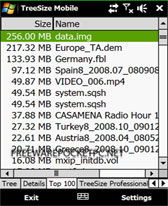
Sometimes you get to a point where your smartphone runs out of disk space. The manual search for large files and folders can take a long time. TreeSize Mobile helps you to find these folders and files and enables you to remove them. The file system is represented in a tree view and it shows you the size of folders, including their subfolders. TreeSize Mobile finds the 100 biggest files and presents them in a list.

TreeSize Mobile Screenshots


no image

Chuck n Damme v1.10

• Summary: Confrontez Chuck Norris et Jean-Claude Van Damme dans leurs citations et actions célèbres... Vous avez le choix entre plus de 60 phrases de JCVD et plus de 10'000 actions de Chuck Norris !

• Requirements:
Windows Mobile Pocket PC 5 , 6 , 6.1, 6.5 eVB libraries are included in the .cab

» Chuck n Damme Description

Developer: i900playeraddict.com
Support Email: omnia@i900playeraddict.com
Web Site: http://www.i900playeraddict.com

Confrontez Chuck Norris et Jean-Claude Van Damme dans leurs citations et actions célèbres... Vous avez le choix entre plus de 60 phrases de JCVD et plus de 10'000 actions de Chuck Norris ! - cliquer sur la croix en haut à gauche pour quitter - cliquer sur le portrait de l'un des deux protagonistes pour commencer - en mode Action, cliquer sur le bouton ":: Menu ::" pour revenir au choix des protagonistes - en mode Action, cliquer sur le bouton vert " >> " ou sur l'image pour afficher la suite Résolution: WQVGA (240*400) et toutes autres résolutions supérieures (redimensionnement automatique) Lien: http://www.i900playeraddict.com/i900_forums/viewtopic.php?f=35&t;=2056 Langue: français (only in french for now)


LinkedIn v1.00

LinkedIn v1.00

• Summary: LinkedIn for Windows Mobile

• Requirements:
Windows Mobile Pocket PC 5 , 6 , 6.1
.NET Compact Framework 3.5
» LinkedIn Description

Made by: Developer e-mail


LinkedIn for Windows Mobile brings your LinkedIn account to your Window Mobile powered phone. See networkupdates / connections / profile etc.

What you get

- Network updates
- See your profile.
- Browse your own connections.
- See the profile of your connections.
- Search for people by name.
- Update your own status.

LinkedIn Screenshots


no image

SciLors QuickTap v0.50

• Summary: SciLor's QuickTap is a simple Click-on-the-shiny-button-as-fast-as-you-can Game. Now with skins and highscore.

• Requirements:
Windows Mobile Pocket PC 5 , 6 , 6.1, 6.5
.NET Compact Framework 3.5
QVGA, VGA, WQVGA, WVGA
Also runs under Windows XP
» SciLors QuickTap Description
Developer: SciLor
Web Site: http://www.scilor.com/

SciLor's QuickTap is a simple "Click-on-the-shiny-button Game". Now with skins and highscore Please use your fingers for playing this (Optimal for the HTC HD2). Using your style may dangerous! I am not responsable for any damage!

SciLor's QuickTap Screenshots

More Info:
http://www.scilor.com/quicktap.html

If you like this tool, please consider donate to the developer. Donate

SciLor's Support

scilor.com/myboard

Update Description:

v0.5 (2010-05-10)
-Enhancement: Easter Skin
-Enhancement: Highscore and 3 Gametypes
-Enhancement: SciLor's UpdateChecker
-New: "Bad"-Fields that should not be tapped!
-Fix: Crash and wrong tap-tracking

v0.2 Alpha (2009-09-30)
-Enhancement: Speed now visible
-Enhancement: 3-2-1-GO
-----------------------

v0.1 Alpha (2009-09-30):
-Initial Release

More detail About scilor you can visit
http://www.scilor.com/
no image

Pocket Shopping v1.50

• Summary: PocketShopping is a finger-friendly shopping list software which allows you to maintain a master list of products you buy on a regular basis.

• Requirements:
Windows Mobile 5.0 or 6.5 with .NET Compact Framework 2.0 or later
» PocketShopping Description

Developer: LopeSoft
Support Email: support@lopesoft.com
Web Site: http://www.lopesoft.com/
PocketShopping is a finger-friendly shopping list software which allows you to maintain a master list of products you buy on a regular basis.

Main features:

- Finger-friendly user interface with smart scrolling, gestures and animation effects, similar to iPhone applications.
- Group the products by shop and by category.
- Unlimited number of shops, categories and products.
- Arrange the categories for each shop, by their location as you walk through the aisles. The products are sorted alphabetically.
- Two operating modes: selecting products to buy and going shopping. First, you must select from the master list the products which you want to buy, also you can add new products, categories and shops. Then, when you go shopping, change to "Go Shopping" mode, and you only will see the products which you selected previously, and then while buying you can mark the products introduced in the shopping cart.
- Set the unit type of each product (units, boxes, packets, Kg, etc.), and set the default unit type of each category (when adding a new product in a category, automatically the default unit type of the category is assigned to the new product).
- Set the quantity to buy for each product and the price.
- Quick search of products by using the keyboard.


no image

UCWEB v7.04

• Summary: UCWEB series help you to put the Internet in your pocket!

•Lisensi  : Freware

• Requirements:
Windows Mobile Pocket PC 5 , 6 , 6.1

» UCWEB Description

Made by: UCWEB Technology v7.0.41
It's a mobile browser. Enjoy a trip to wireless internet world.

UCWEB Features: - Browsing function
- Navigation function
- Search function
- Email service
- Download function
- Personal data managemet
- RSS subscription function
- Shortcut key application

 Six reasons to fall in love with UCWEB
Browsing function
Are you boring with a dull WAP site? Are you upset with the blank display in a wap site? UCWEB will change all those problems on the mobile Internet! with UCWEB, you can not only visit WAP site quickly, but also the colorful WEB sites fluently, to enjoy the pleasantness of wireless thoroughly.

Navigation function
Wireless is more colorful! Information, entertainment, community, forum, blog, it’s all we have. Site navigation service recommends excellent internet sites and hot sites to you! Click! click! click! It’s so easily to access the site. Opening the site you want quickly, reading what you like, and listening what you love.

Search function
Don’t doubt the voluminous information can be searched on your mobile phone! With UCWEB, you can do it! UCWEB offers various search engines, such as Baidu, Google, Yicha, to satisfy your desire of searching the whole Internet. UCWEB supports to search by sort, such as web pages, MP3, pictures, maps,etc

Media function
Online media playback function is available in UCWWEB 6.3. You may watch the hottest TV channels and the splendid original video clips and listen to the latest popular songs on your phone with UCWEB6.3.

Download function
Beautiful pictures!MP3!Characteristic phone ring tone! UCWEB lets you get all you want. The powerful download function makes your download easily, and which make you save time and cost. UCWEB download function supports the big file download and the break points discontinuous transmission, which adopts the data compression technique to reduce the data traffic.

Personal data management
Do you regret that you can’t save the sites/pages you like? Is there no storage space for storing MP3, games? Is data lost when you change mobile phone? Don’t worry, UCWEB resolves these problems for you! It offers service such as bookmark, favorite, user can manage web sites which regularly browsed easily in mobile phone or in PC. The mobile phone hard disk is the bridge of PC and mobile phone, by which accessing the picture, MP3 and game is easy

RSS subscription function
With a mobile phone, the latest hot Internet information can be subscribed! With RSS news subscription function you can subscribe RSS seeds, and manage the RSS resource, and then read the updated details in RSS freely. You can login directly in your mobile phone, or open http://my.ucweb.com/ to subscript the RSS seeds.

Shortcut key application
With the shortcut key function, it makes the whole operation process of UCWEB simply, convenient. You can assemble shortcut keys with single key or double keys, and setup shortcut key by yourself. The customized service makes you enjoy the fully wireless happiness.
no image

fim - Facebook Instant Messengerv2.35

• Summary: Facebook Chat and More
• Requirements:
Windows Mobile Pocket PC 5 , 6 , 6.1, 6.5
» fim - Facebook Instant Messenger Description
Developer: Mosko.Mobi
Web Site: http://mosko.mobi/
Features:
* Facebook Chat
* Status Feed
* Notifications & New Messages Indicators
* Picture & Video Uploads Directly From Your Phone
* Integrated m.facebook.com Browser

Advantages:
* All Display Resolutions
* Touch Friendly
* No 3rd Party Registration
* AppToDate Support

Installation:
Download the mobile installer (.cab file) to your desktop. Sync with your mobile phone and copy the .cab installer to your phone. From your phone go to Programs -> File Explorer, navigate to the .cab file and select it. The Installer should do the rest.


no image

Simple Stopwatch v2.10

• Summary: A simple stopwatch.

• Requirements:
Windows Mobile Pocket PC 5 , 6 , 6.1 .NET CF 3.5


» Simple Stopwatch Description

Developer: Ty Gatti

Support Email: ty@ozunite.com
Web Site: http://ozunite.com/
A simple stopwatch.


Simple Stopwatchv2.10
Quick Message
Press Esc to close
Copyright © 2013 100Share 4U All Right Reserved