Breaking News
Loading...

Recent Post

Showing posts with label task. Show all posts
Tuesday, May 4, 2010
no image

Foliant – Library-Reader for Mobile Phones


Foliant is a library-reader for mobile phones with support for Java. Its main function is to organize your collection of books and comfortable reading.

Features
  • support TXT format and FB2
  • full-fledged library, grouping of authors, genres and other parameters
  • search and download books from the Internet
  • Work with ZIP archives as folders with the support GZip archives
  • user-friendly menu with support for kinetic scrolling
  • Support for all major encodings WIN-1251, ISO-8859-5, UTF-8, KOI8R, DOS
  • portrait / landshftnogo regimes
  • three modes of paging book: kinetic scrolling, page-stroke paging, page-paging in zones
  • hyphenation of words (supports English and Russian rules of transfer)
  • detailed setting of text formatting
  • Support profile settings
  • Backlight Control (only Nokia)
  • Russian, English and Ukrainian localization
  • Download
  • Foliant 0.6.0
Source :http://java-phones.com/
~Download Now
Monday, May 3, 2010
no image

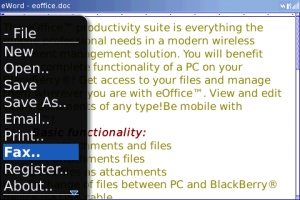
eOffice – Turn your BlackBerry into a Mobile Office

eOffice is a blackberry app that allows you to view, edit, and create Microsoft Word and Excel files on your BlackBerry.Using eOffice, you can send and receive documents and spreadsheets by email as attachments.eOffice also allows you to send, receive, and view PDF files*.With support Microsoft Office file formats: DOC, XLS, Excel (.xlsx), PowerPoint (.ppt), plus PDF, faxes and images.

eOffice comes with an unlimited, subscription free online storage where you can store Office files and access them on your BlackBerry.

Now compatible with the BlackBerry 5.0 operating system, providing the best viewing experience available on your Bold and Tour devices.

~Download Now
Saturday, April 17, 2010
Pilot Pocket Checklistsv1.23

Pilot Pocket Checklistsv1.23

• Summary: Create, edit and use checklists for preflight and flying. Pilot Pocket Checklists is optimized for single hand use in shaky cockpits.

• Requirements:
 Windows Mobile Pocket PC 5 , 6 , 6.1, 6.5 .NET CF 3.5 (included in installation)

» Description
Developer: Pilot Pocket Software
Support Email: support@pilotpocket.com
Web Site: http://pilotpocket.com

Using PilotPocket Checklists you can create, edit and use checklists for all your preflight and flying tasks. You can go through the checklists using arrow keys only - you need only one hand and no stylus.
Features at a glance
Keyboard-only mode support (stylus is required for editing)
Configurable item text size.
Full-screen mode support - no wasted space for menus and status bars.
Fast switching between checklists.
Unlimited number of checklists and checklist items
1.23 version updates
Fixed problem with large custom on-screen keyboards in entry and edit forms.
1.22 version updates
Application close/minimize button behavior is now configurable.
Application now checks that only one instance is active at a time.
1.21 version updates
Devices with screen resolutions above 320x240 are now supported
1.20 version updates
Added emergency/normal checklist types with hardware key switching.
Unnecessary checklist files can be hidden temporarily.
1.10 version updates
The old title bar and buttons replaced with the new navigation bar.
Copy/paste added to all edit forms.
If you see the bug, do not like something or have a suggestion do not hesitate to send your feedback directly to the developer at support@pilotpocket.com
Wednesday, April 14, 2010
Lost In Translationv1.00

Lost In Translationv1.00

• Summary: Ever find yourself in a foreign country eager (or clueless) to what is written on a shop sign or restaurant menu? With your trusty phone, its camera and some smart cloud services that could all be a thing of the past.
• Requirements:
Windows Mobile Pocket PC 5 , 6 , 6.1, 6.5.x

This initial release works on Windows Mobile 6.x WVGA (e.g. HD2) , VGA and QVGA PPC Phones and enables you to take pictures of Japanese signs or text for translation into English.

Features:
User friendly and handy travel companion.
Provides Japanese Character Recognition and Translation.
Integrated with Japanese Character Recognition cloud services.
Google Translation integration for Multilanguage output support.

Monday, March 22, 2010
Tuesday, March 16, 2010
» AZpen Text Input for SymbianUIQ (free shareware version)

» AZpen Text Input for SymbianUIQ (free shareware version)

• Summary: Reliable text input usable even with fingertip & when on the move. Free shareware version.
• Price: Freeware

» AZpen Text Input for SymbianUIQ (free shareware version) Description

AZpen is a new way to enter text that can be used without a stylus - even on the move when other methods are impractical.

AZpen allows you to use your device in more places and situations making it more useful to you.

This is the free shareware version with some feature and date limitation. For no limitations buy the commercial version.

Key Features

Fingertip Operation for texting on the move

It is possible to dispense with the stylus and enter text with just a fingertip. Operation is so easy you can even write while travelling or walking along.

Simple Gestures for reliable error-free input

With just a single straight line for every letter, number and common punctuation these simple strokes are quick to draw and easy to interpret so no mistakes are made.

Vowels+Alphabet memorable layout

The alphabetic layout has a vowel at the start of each row acting as a signpost for new users to quickly determine each letter. The vowels and alphabet are the best known sequences of letters and together they make a supremely memorable combination.

See Your Application and use it too

There is no keyboard or writing area to use up the screen so your app remains fully visible and fully usable.

Easy Accents and other symbols

Accented letters, currency symbols etc are all available using a logical and intuitive method that is quick and simple.

User Shortcuts for customisation

More than two hundred shortcuts may be user-defined for frequently used words, short phrases and special characters.

Interactive Tutorial for quick learning
A comprehensive 20 topic tutorial to guide beginners complete with interactive exercises to allow users to try out and practise for themselves. And whenever AZpen is being used, instant reference help can be displayed on demand.

Compatibility
Symbian UIQ based SonyEricsson P800, P900 & P910 or true compatibles only.

More
Please visit www.textratech.com for more information.

Download
the AZpen Text Input for SymbianUIQ (free shareware version) for Symbian OS
Saturday, March 13, 2010
» Opera Mobile 10 Beta

» Opera Mobile 10 Beta

Summary
  • A full desktop browser on your smartphone
  • Requirements: Symbian S60`
  • Price: Freeware
The Opera Mobile browser offers a fast and rich mobile Web experience. And it is free.


  • Fast - Opera Mobile 10 beta is faster at downloading pages, zooming, panning and almost everything else you do with a mobile browser.
  • Intuitive - Combines the best from our desktop browser and mobile browsers to form an advanced and highly intuitive, new interface.
  • Tabs - Why close one Web page to open another? Now, open as many tabs as you like. Read your mail in one window, Facebook in another, Twitter in a third.
  • Speed Dial - Get to your favorite Web pages with just one click, with a set of visual bookmarks that appear when you open a new tab.
  • Free - Opera Mobile 10 beta is free.
Opera Mobile 10 Video Preview


» UCWEB

» UCWEB

  • Summary: UCWEB series help you to put the Internet in your pocket!
  • Requirements: Symbian OS
  •  Price: Freeware

» UCWEB Description


Enam alasan untuk jatuh cinta dengan UCWEB

Fungsi browsing
Apakah Anda membosankan dengan situs WAP yang membosankan? Apakah Anda kesal dengan layar kosong di situs wap? UCWEB akan mengubah semua masalah-masalah pada mobile internet! dengan UCWEB, Anda tidak hanya dapat mengunjungi situs WAP dengan cepat, tetapi juga situs WEB warna-warni dengan lancar, untuk menikmati kenikmatan nirkabel secara menyeluruh.

Fungsi navigasi
Nirkabel lebih berwarna! Informasi, hiburan, komunitas, forum, blog, semua yang kita miliki. Merekomendasikan layanan navigasi situs internet baik situs dan situs-situs panas untuk Anda! Klik! klik! klik! Ini sangat mudah untuk mengakses situs ini. Membuka situs yang Anda inginkan dengan cepat, membaca apa yang Anda suka, dan mendengarkan apa yang Anda cintai.

Fungsi pencarian
Tidak meragukan informasi produktif dapat dicari di ponsel Anda! Dengan UCWEB, Anda dapat melakukannya! UCWEB menawarkan berbagai search engine, seperti Baidu, Google, Yicha, untuk memuaskan keinginan Anda mencari seluruh Internet. UCWEB mendukung untuk melakukan pencarian berdasarkan jenis, seperti halaman web, MP3, gambar, peta, dll

Fungsi media
Fungsi pemutaran media online tersedia dalam UCWWEB 6.3. Anda dapat menonton saluran TV terpanas dan indah asli klip video dan mendengarkan lagu-lagu populer terbaru pada telepon Anda dengan UCWEB6.3.

Fungsi download
Indah gambar! MP3! Karakteristik nada dering telepon! UCWEB memungkinkan Anda mendapatkan semua yang Anda inginkan. Fungsi download yang kuat membuat Anda download dengan mudah, dan yang membuat Anda menghemat waktu dan biaya. UCWEB mendukung fungsi download file besar download dan transmisi terputus break point, yang mengadopsi teknik kompresi data untuk mengurangi lalu lintas data.

Manajemen data pribadi
Apakah Anda menyesal bahwa Anda tidak dapat menyimpan situs / halaman Anda sukai? Apakah tidak ada ruang penyimpanan untuk menyimpan MP3, games? Adalah data yang hilang ketika Anda mengubah ponsel? Jangan khawatir, UCWEB menyelesaikan masalah ini untuk Anda! Menawarkan jasa seperti penunjuk, favorit, pengguna dapat mengelola situs Web yang diakses secara teratur dengan mudah di ponsel atau di PC. Telepon selular hard disk adalah jembatan PC dan ponsel, oleh yang mengakses gambar, MP3 dan permainan yang mudah

Berlangganan RSS fungsi
Dengan ponsel, panas terbaru internet informasi dapat berlangganan! Dengan berlangganan berita RSS fungsi Anda dapat berlangganan RSS biji, dan mengelola sumber daya RSS, dan kemudian membaca rincian diperbaharui di RSS bebas. Anda dapat login langsung di ponsel Anda, atau membuka untuk subskrip http://my.ucweb.com/ RSS biji.

Tombol pintas aplikasi
Dengan cara pintas fungsi kunci, itu membuat seluruh proses operasi UCWEB sederhana, nyaman. Anda dapat berkumpul dengan satu tombol pintas tombol atau tombol ganda, dan setup shortcut key sendiri. Layanan yang disesuaikan membuat Anda menikmati nirkabel penuh kebahagiaan.

UCWEB Screenshots


UC Thunder

UC Thunder


  • Summary: UCThunder v 1.06 - download manager for S60 3rd devices by UCWeb developers. UCThunder supports download from HTTP, FTP, and BT. Associated with UCWeb 7.0 browser, supports resuming and many many more.
  •  Requirements:Symbian s60 3th edition Associated with UCWeb 7.0 browser
  •  Price: Freeware


Key Features:

  • Support for mobile GPRS, EDGE, 3G, WiFi access points for download.
  •  Available from URL input [HTTP, FTP, Thunder address (thunder://), Express Address (flashget://)] download function.
  • Support open local paper bt seed to download.
  •  Default provision of the software, film, music, games, themes and other recommended download.
  • Available for download resources, search functionality, including music, software, themes and other resources search.
  • Available for download and download capabilities of task management functions.
  •  Client supports background downloading and accompanied by front suspension box displays progress.
  • Suspended box a custom location.
  •  Bluetooth function for downloaded file sharing capabilities.
  •  Support for UC Browser 7.0 final version of each call.
  • Support and associated with UC Browser 7.0 final version download, currently supports BT/FTP/Thunder/Express resources related downloads.
  •  Support association with default phone browser to download, currently supports for HTTP protocol to download related resources.
What's new:

  • Limits on BT downloads (500 Mb).
  •  Added option Copy/Paste URL.
  •  Optimized and improved UI (pop-up windows, etc.).
  • Improved stability in the download process.
  • Added seach history (keyword search).
NOTES:

  •  UC browsers only support the official version 7.0 and later versions used in conjunction with the association.
  •  Please download and install UC Browser 7.0 final version, use the Thunder and the association between UC capabilities.
Quick Message
Press Esc to close
Copyright © 2013 100Share 4U All Right Reserved